

















THE EVOLVED EDIT
Can Apple Watch Charge on MagSafe? What Actually Works

The short answer
No—an Apple Watch does not charge on the single MagSafe puck made for an iPhone. It needs an Apple Watch charging cable or a station with a dedicated Apple Watch charging surface. A 3-in-1 charger can power both devices, but they use different positions.
The names can be confusing: Apple's MagSafe Duo Charger does charge a watch because it includes a separate watch connector. That does not make its phone pad a watch charger.
Magnetic does not mean interchangeable
An iPhone's magnetic charging pad and an Apple Watch charging connector serve different devices. A magnet holding something in place is not proof that power is reaching its battery. Apple's watch instructions specify placing the watch's back against its dedicated magnetic connector and checking the on-screen charging symbol. Apple: charging Apple Watch.
- Single iPhone MagSafe puck: use it for devices listed by its manufacturer, not as a substitute for an Apple Watch charger.
- Apple Watch charging cable: use its watch connector; it is not an iPhone charging pad.
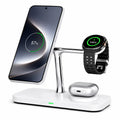
- Multi-device station: use the phone area for the iPhone and the dedicated watch connector for Apple Watch.
Apple's MagSafe Duo illustrates the distinction: its phone and watch positions share a power input, but the watch has its own connector that can lift upright. Larger watch bodies or bands may require adjusting that connector's position. Apple: MagSafe Duo setup.
Upgrading to iPhone 18 Pro? Keep the watch charger in your plan
Apple has officially announced iPhone 18 Pro and iPhone 18 Pro Max. If you are upgrading your phone but keeping your watch, do not remove the watch cable from your travel kit unless its replacement station specifically supports Apple Watch.
Plan the change around two questions: will your current charger work with the new phone, and where will the watch charge? Replacing the phone's charging accessory does not automatically answer the second question.
For phone-specific standards and adapter checks, read our iPhone charging guide. This guide focuses on the separate watch connection.
How to set up a phone-and-watch charging station
A station should simplify your routine, not leave you guessing whether both devices are charging.
- Power the station correctly. Use its supplied cable and a power adapter that meets the manufacturer's input requirements.
- Open the dedicated watch position. Follow the station's instructions for folding or rotating parts; do not force a hinge.
- Seat the back of the watch on its connector. Keep the band from lifting the watch away from the charging surface.
- Check each device separately. Look for the charging indicator on the watch and on the phone. One charging successfully does not establish that the other is receiving power.
Apple recommends a flat, well-ventilated charging location. If the watch does not begin charging, recheck the power connection and its position on the watch connector. Apple: watch charging setup.
Does a 3-in-1 charger fast-charge Apple Watch?
Not necessarily. Apple Watch compatibility, watch fast charging and the phone's advertised wattage are separate specifications. A large number attached to the phone pad is not a watch charging-speed claim.
Apple's fast-charge guidance requires a supported watch, the appropriate fast-charging hardware and a suitable power adapter. Temperature, battery level and activity during charging also affect timing. Do not apply Apple's laboratory charging times to another station without evidence for that exact combination. Apple: fast-charge requirements.
If you wear your watch overnight and rely on short daytime top-ups, prioritize explicit watch fast-charge support when comparing products. If charging time is flexible, a correctly supported standard-rate watch position may meet your needs.
Choosing one station for your iPhone and Apple Watch
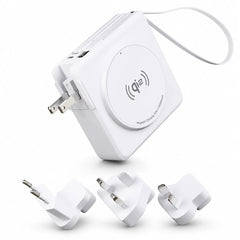
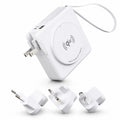
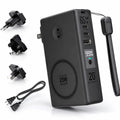
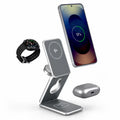
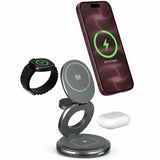
The MagFold Pro is an Evolved option with separate phone, Apple Watch and wireless-earbud charging positions. Its current compatibility list includes iPhone 18 Pro and Pro Max alongside supported Apple Watch models. Check your exact watch in that list; watch fast charging is not guaranteed for every model.
Before ordering, confirm the device list, the required adapter and what is included. If you also charge AirPods, check the charging case—not only the earbuds' name. The station requires a wireless-charging earbud case.
Browse Apple multi-device chargers for other layouts, or use our foldable travel charger comparison when packing size matters.
Two common follow-up questions
Does the name “MagSafe Duo” mean one pad works for both devices?
No. Apple's MagSafe Duo Charger has separate phone and Apple Watch charging positions. Use the dedicated connector for the watch.
Should I replace a working Apple Watch charging cable when I buy a new iPhone?
Not solely because you changed phones. Keep it if it still suits your watch and routine. Choose a shared station when reducing separate charging pieces is useful, and verify the station's watch support before leaving the cable at home.